Designing multi-tenant localization systems

A multi-tenant SaaS product serves many customers from one codebase and one deployment. Sooner or later, one of those customers asks for different wording. A recruitment agency wants "Candidates" where your app says "Contacts". A hospital group needs "Patients". A white-label partner wants its own brand name in every email.
Multi-tenant localization is the part of your system that answers one question: for this tenant, in this language, what text should this key show? This post explains how to model that, how to deliver it fast, and how to keep it maintainable when you have 5 tenants and when you have 500. The patterns apply to any stack. Later sections show how the same design works in SimpleLocalize with customer contexts and customer translations.
This post expands the multi-tenant section of our technical guide to i18n and software localization, which covers the wider architecture: file formats, key design, CI/CD, and testing. If you are still setting up the basics, start with our internationalization guide for SaaS teams and come back here when the first tenant asks for custom copy.
What is multi-tenant localization
In a standard localization setup, a translation is identified by two things: a translation key and a language. button.book in en gives "Book now".
In a multi-tenant localization system, there is a third dimension: the tenant. button.book in en for tenant grand-hotel gives "Book your stay". For every other tenant it still gives "Book now".
So the lookup changes from this:
(key, language) -> text
to this:
(key, language, tenant) -> text
The rest of the design follows from how you store that third dimension and how you resolve it at runtime.
What tenants usually want to change
It helps to know the real requests before you pick a data model. In most B2B products they fall into five groups:
- Terminology: the tenant's industry uses different nouns. "Projects" become "Campaigns", "Members" become "Students".
- Tone of voice: formal or informal address. In German this is the choice between "Sie" and "du", and it affects hundreds of strings.
- Brand names: white-label products replace your product name with the tenant's name in the UI, emails, and PDF documents.
- Legal and compliance text: consent text, disclaimers, and footer notes that the tenant's legal team wrote.
- Regional wording: a tenant in Switzerland wants Swiss German spelling, but only for a few visible labels.
Two things stand out. First, a tenant almost never changes everything. Most tenants override a small share of your keys and keep the rest. Second, the changes are per language. A tenant may customize English and German and leave the other 12 languages as they are.
A good design stores only the differences.
Three data models for tenant-specific translations
There are three common ways to store tenant-specific translations. Teams often start with the first one and migrate to the third.
Model 1: a full copy per tenant
Each tenant gets its own complete set of translation files, or its own project in a translation management system.
locales/
  default/en.json        (2,000 keys)
  grand-hotel/en.json    (2,000 keys, 40 of them changed)
  beach-resort/en.json   (2,000 keys, 15 of them changed)
It is simple to build and simple to reason about. It stops working when you add a key. Every new key has to be copied into every tenant's files and translated or synced again. With 30 tenants and 12 languages, one new button label means 360 file updates. Copies also go stale: a typo fixed in the default file stays wrong in every copy.
Use this model only when tenants are truly separate products that share little text.
Model 2: tenant-specific keys
All text lives in one set of files, and tenant variants get their own keys.
{
  "button.book": "Book now",
  "button.book.grand-hotel": "Book your stay",
  "button.book.beach-resort": "Reserve today"
}
There is no duplication of unchanged text, which is an improvement. The problems are different:
- Every tenant downloads every other tenant's text. That is wasted bytes, and it can leak names of your customers or their private wording.
- The application code has to build key names with string concatenation, which breaks static key extraction and unused key detection.
- Translators see three unrelated keys instead of one key with variants, so context is lost.
Model 3: base translations plus an override layer
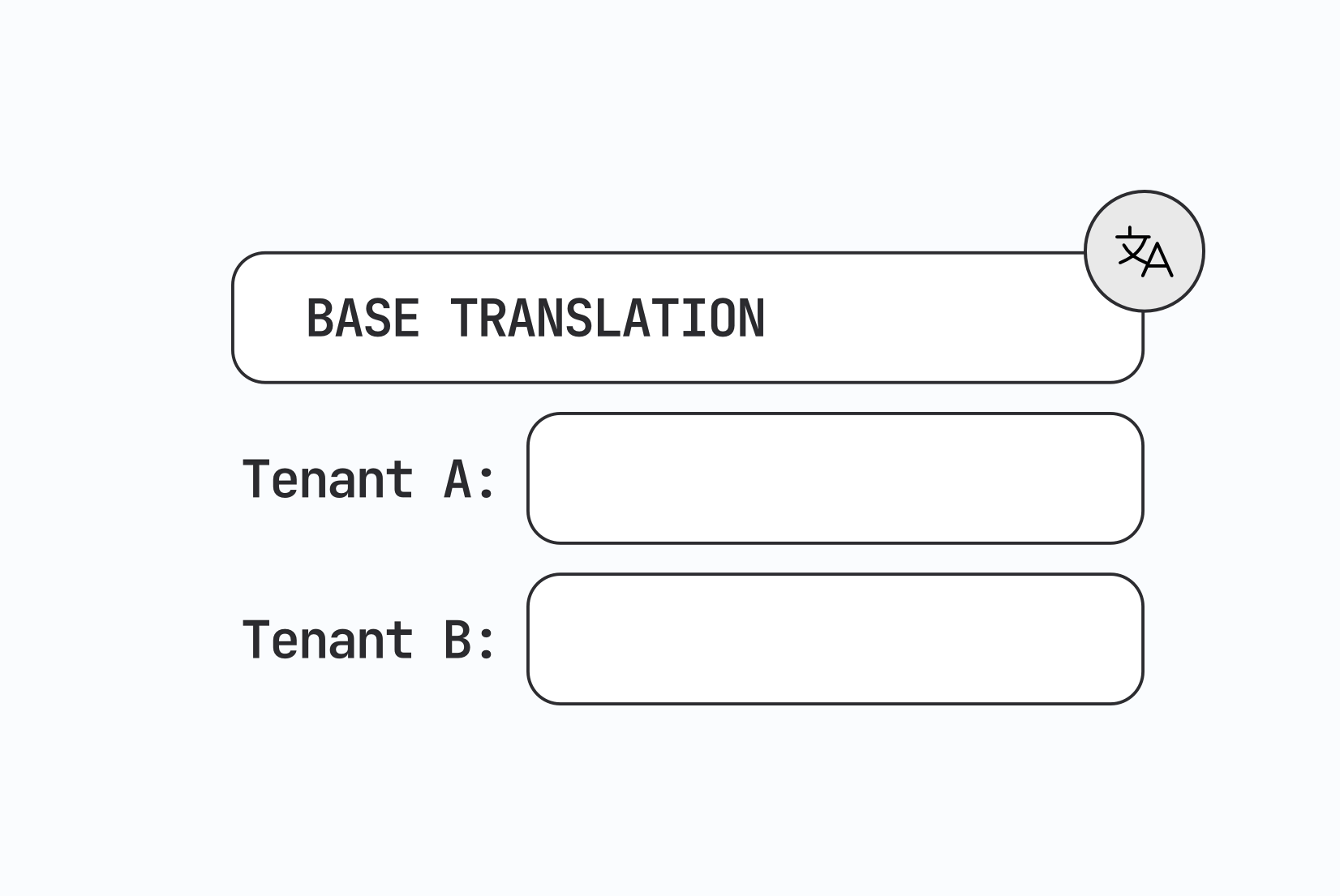
There is one base translation set that every tenant gets by default. Each tenant has a sparse layer on top of it that holds only the changed values. The key stays the same.
base:          button.book (en) = "Book now"
grand-hotel:   button.book (en) = "Book your stay"
beach-resort:  (no override)
The application always asks for button.book. The system decides which value to return. This is the model most mature multi-tenant systems use, and it is the one the rest of this post describes.
| Full copy per tenant | Tenant-specific keys | Base + override layer | |
|---|---|---|---|
| Stored text per tenant | All keys | Changed keys only | Changed keys only |
| Adding a new key | Update every tenant | One place | One place |
| App code knows about tenants | No | Yes, in key names | No |
| Tenant sees other tenants' text | No | Yes | No |
| Works with key extraction tools | Yes | Poorly | Yes |
| Good for | A few separate products | Quick prototype | SaaS and white-label products |
Designing the fallback order
With an override layer, every lookup walks a chain until it finds a value. The basic chain has two steps:
- Tenant override for the key in the requested language
- Base translation for the key in the requested language
Real products also have fallback languages and regional variants, for example de-CH falling back to de, then to en. Once you combine tenants and language fallback, you have to decide the order. Take a tenant that customized de and a user who asks for de-CH:
- Tenant override in
de-CH - Base translation in
de-CH - Tenant override in
de - Base translation in
de - Base translation in the default language
- The key itself, or an empty string
This order is called language-first: stay in the closest language as long as possible, and inside each language prefer the tenant's value. It is the right default for UI text, because showing a user the correct regional wording matters more than showing the tenant's term in a less specific language.
Some teams choose tenant-first order for brand and legal text, where the tenant's wording must always win. If you need both, mark those keys with a tag or put them in a separate namespace, and apply the stricter order only there. Write the order down. It is the most common source of "why does this customer see the wrong text" support tickets.
A resolver for the language-first order fits in a few lines:
type Messages = Record<string, string>;

interface TranslationSource {
  base: Record<string, Messages>;                        // language -> messages
  overrides: Record<string, Record<string, Messages>>;   // tenant -> language -> messages
}

function resolve(
  source: TranslationSource,
  key: string,
  languageChain: string[],   // e.g. ["de-CH", "de", "en"]
  tenantId?: string
): string {
  for (const language of languageChain) {
    const override = tenantId ? source.overrides[tenantId]?.[language]?.[key] : undefined;
    if (override !== undefined) {
      return override;
    }
    const base = source.base[language]?.[key];
    if (base !== undefined) {
      return base;
    }
  }
  return key;
}
In production you rarely run this per key at runtime. You run it once per tenant and language when translations are published, and you ship the result as a finished file. More on that below.
Identifying the tenant
The localization layer needs a stable tenant identifier before it can load anything. Common sources are:
- the subdomain or custom domain (
grand-hotel.yourapp.com) - a claim in the session token or JWT
- the organization ID from the user's profile
Three rules keep this part safe and predictable:
- Use a stable ID, not a display name. Tenants rename themselves. An ID like
acct_8742or a fixed slug survives that. - Keep the ID URL-safe. It will end up in file names and CDN paths. Letters, numbers, dashes, and underscores are enough.
- Resolve the tenant before the first render. If the app renders with base text and then swaps to tenant text, users see a flash of the wrong wording. For server-rendered pages, resolve the tenant on the server. For single-page apps, load the tenant's translations before mounting the UI.
Not every tenant needs an entry in your localization system. Only tenants with at least one override do. Everyone else uses the base files, which keeps the number of published files small.
Delivering tenant translations
There are three places where the base and the override layer can be merged.
Merge in the client. The app downloads the base file and the tenant's override file, then merges them in memory. This is two requests instead of one, and the UI has to wait for both.
Merge at request time on a server. An API reads both layers from a database and returns the merged result. This is flexible, but every page load now depends on your API and database being fast and available.
Merge at publish time. When someone publishes translations, the system builds one finished file per tenant and language and puts it on a CDN. The app requests one static file. This is the fastest option for readers and the one to prefer for frontend and mobile apps.
With publish-time merging, the number of files is easy to estimate:
files = languages x namespaces x (tenants with overrides + 1)
A product with 12 languages, 4 namespaces, and 20 customized tenants publishes 12 x 4 x 21 = 1,008 small files. That is fine for a CDN. It is a reason to avoid creating an override layer for tenants that have nothing to override.
Caching rules
Tenant-aware caching goes wrong in one specific way: tenant A gets tenant B's text. To prevent it:
- Put the tenant ID in the URL path, not in a header or cookie. Then every CDN and browser cache keys on it without extra configuration.
- Never cache a merged response under a key that has only the language in it.
- Version or purge per environment, so that publishing a change for one tenant does not force every user to download everything again. Our post on environment-based localization covers staging and production setups.
- Decide what happens when the tenant's file is missing. The safe behavior is to load the base file for the same language and log the event.
Permissions and tenant isolation
Translations are usually public text, but in a multi-tenant product they still need access rules. Ask these questions early:
- Who edits the base text? Usually your own product and localization team.
- Who edits a tenant's overrides? Your customer success team, the tenant's own staff, or both.
- Can a tenant see other tenants? They should not see other tenants' overrides, and often should not see the list of your customers at all.
- Who approves changes? Tenant-written text still appears inside your product. A review step catches broken placeholders and text that is too long for the layout.
Letting tenants edit their own overrides is a strong feature for enterprise and white-label deals. It moves small wording requests out of your support queue. It only works if the tool can limit a user to one tenant's layer and to selected languages.
Keeping overrides healthy over time
The override model has one weak point: the base text and the overrides change at different times. Plan for these cases.
-
The base text changes. You rewrite "Book now" to "Check availability" because the button now opens a calendar. The tenant's override still says "Book your stay", which now describes the wrong action. When a base translation changes, flag its overrides for review.
-
Placeholders change. The base text becomes
"{count} rooms left"and the override is still"Only a few rooms left". Or worse, the override uses a placeholder that no longer exists. Validate that every override uses the same ICU placeholders and plural forms as its base string. -
A key is deleted or renamed. Overrides for deleted keys should go away with the key. If you rename keys, migrate the overrides in the same step. See our best practices for translation keys for naming rules that reduce renames.
-
A tenant leaves. Offboarding should remove the tenant's layer and its published files.
-
A new language is added. The tenant's overrides exist in English and German only. In the new language they get base text, which may use the term they asked you to replace. List the tenant's overridden keys and translate those into the new language as part of the rollout.
-
Testing. Add at least one test tenant with overrides to your staging environment. Check a page with an overridden key, a page with no overrides, and the behavior for an unknown tenant ID.
Multi-tenant localization in SimpleLocalize
SimpleLocalize implements the base plus override model with a feature called customer contexts. A customer context is the tenant layer. Customer translations are the override values stored in it. Base translations stay as they are, and each customer context holds only the text that differs.
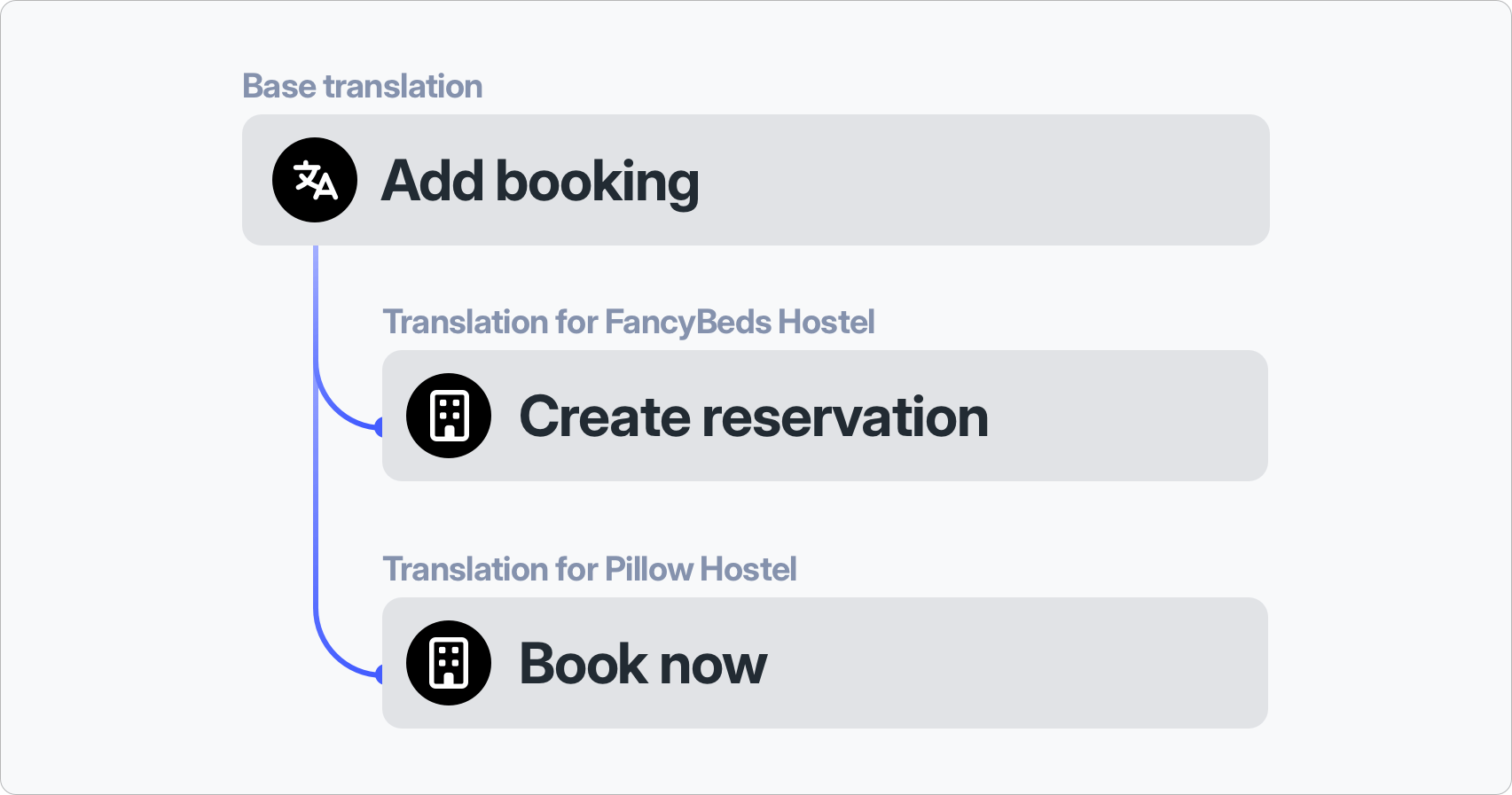
Create a customer context
Open the Languages tab in your project and click Add customer context. Enter a customer ID and an optional description. The ID must be unique in the project, can be up to 40 characters long, and can contain letters, numbers, dashes, and underscores. That matches the URL-safe ID rule from earlier, so you can reuse your own tenant slug or account ID.
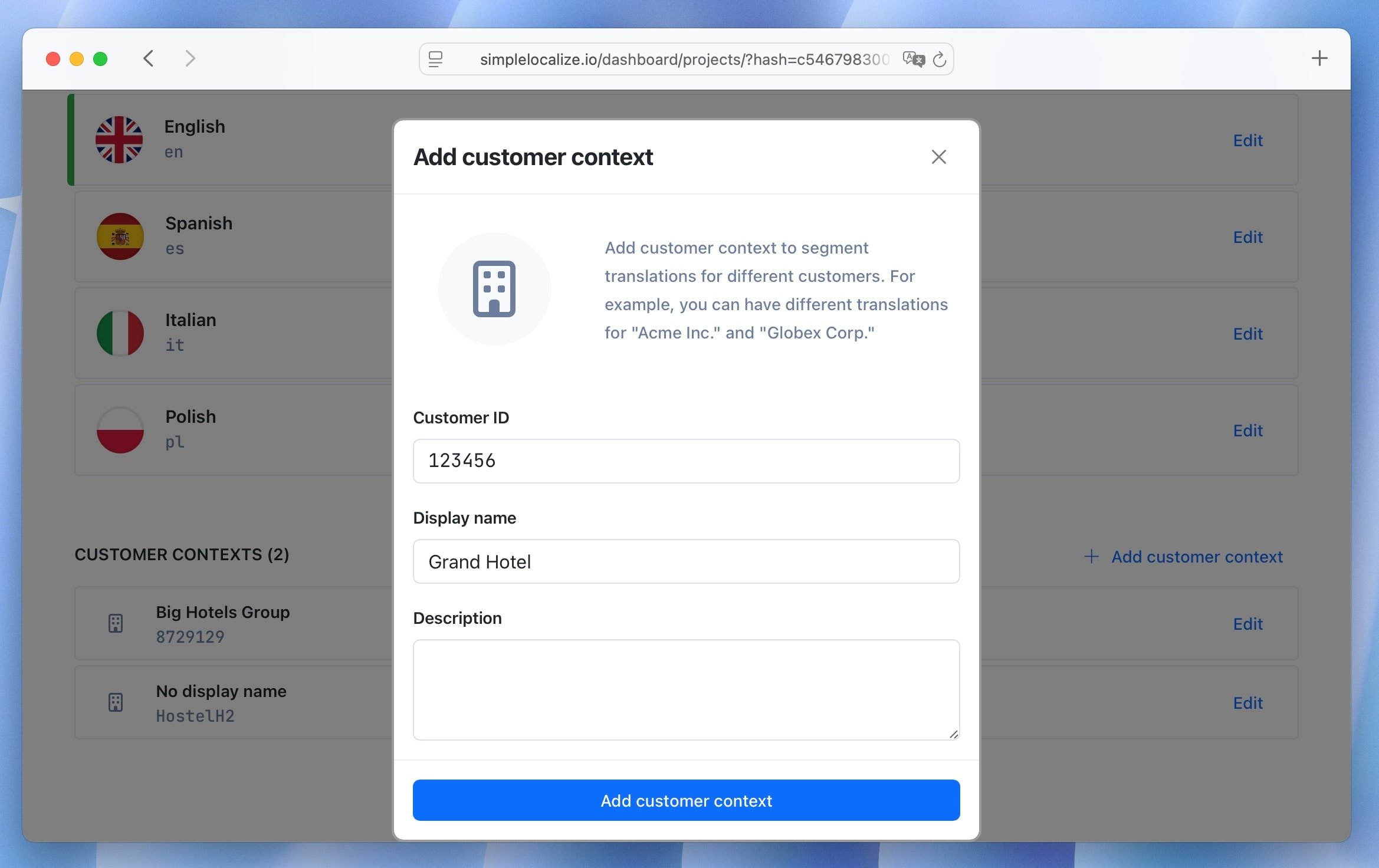
If tenants are created by your backend during onboarding, create the context with the Customer API instead:
curl --location --request POST 'https://api.simplelocalize.io/api/v1/customers' \
  --header 'X-SimpleLocalize-Token: <API_KEY>' \
  --header 'Content-Type: application/json' \
  --data-raw '{
    "key": "grand-hotel",
    "description": "Grand Hotel Group, white-label booking portal"
  }'
The same API can list, update, and delete customers, which covers tenant offboarding. Customer contexts are available in the Business plan with a limit of 25 customers per project. The limit can be raised on a custom plan.
Add customer translations
Customer translations are added in the translation editor, next to the base translation for the same key and language. Empty customer fields show the base text as a placeholder, so you always see what the tenant gets if you leave the field empty.
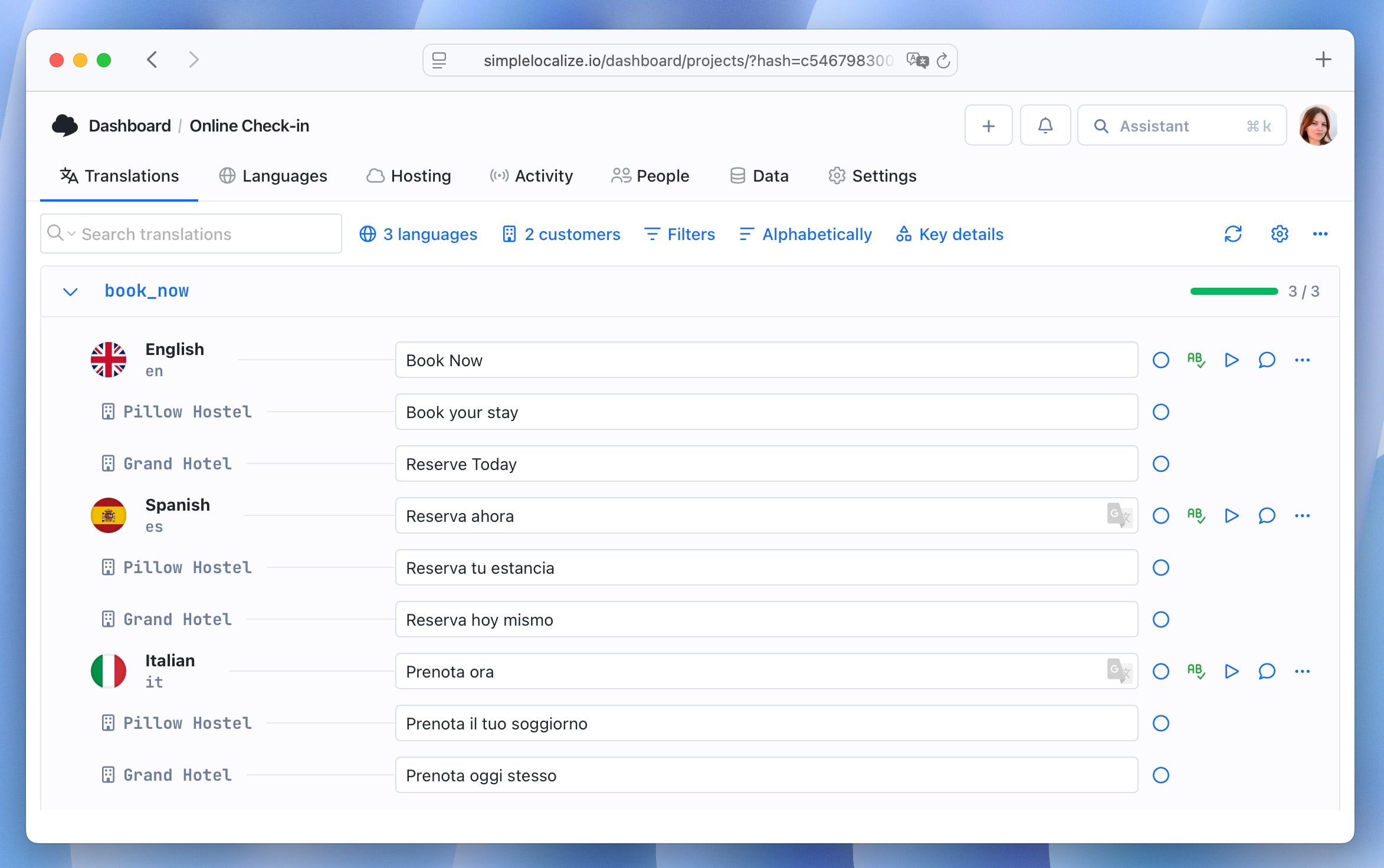
To set an override from code, send a translation with the customerId field to the translations API:
curl --location --request PATCH 'https://api.simplelocalize.io/api/v2/translations' \
  --header 'X-SimpleLocalize-Token: <API_KEY>' \
  --header 'Content-Type: application/json' \
  --data-raw '{
    "key": "button.book",
    "language": "en",
    "customerId": "grand-hotel",
    "text": "Book your stay"
  }'
In the editor you can filter by customer context to work on one tenant at a time, or show base translations only. Search can also be scoped to customer translations. Customer translations get the same tools as base translations:
- Review status: each customer translation has its own review status. Use it for the "base text changed" case described above.
- Auto-translation: you can auto-translate a customer translation into other languages. The source is the customer's text in the source language, not the base text, so the tenant's terminology carries over. This covers the "new language is added" case.
- Translation history: every customer translation keeps its own history with who changed it and when, and you can restore a previous version.
- Editing tools: customer translations with plurals open in the Pluralization Manager, and longer content opens in the Text Editor.
Fetch tenant translations from the CDN
Translation Hosting merges the layers at publish time. When you publish, SimpleLocalize builds separate resources for each customer context. Your app requests them by adding the customer ID to the language key:
# Base translations for one language
https://cdn.simplelocalize.io/{projectToken}/_latest/en

# Translations for one language with overrides for the customer
https://cdn.simplelocalize.io/{projectToken}/_latest/en_grand-hotel

# All languages with overrides for the customer
https://cdn.simplelocalize.io/{projectToken}/_latest/_index_grand-hotel

# One namespace for the customer
https://cdn.simplelocalize.io/{projectToken}/_latest/en_grand-hotel/common
The response is already merged. Keys with a customer translation return the customer's text. All other keys return the base translation:
{
  "button.book": "Book your stay",
  "button.cancel": "Cancel"
}
If you request a customer ID that does not exist in the project, Translation Hosting returns a 404 response. That gives you a clear rule for the loader: try the tenant file, and on 404 load the base file.
const CDN = "https://cdn.simplelocalize.io";
const PROJECT_TOKEN = process.env.NEXT_PUBLIC_SIMPLELOCALIZE_TOKEN;
const ENVIRONMENT = "_latest";

export async function loadMessages(
  language: string,
  tenantId?: string
): Promise<Record<string, string>> {
  const baseUrl = `${CDN}/${PROJECT_TOKEN}/${ENVIRONMENT}/${language}`;

  if (tenantId) {
    const tenantResponse = await fetch(`${baseUrl}_${tenantId}`);
    if (tenantResponse.ok) {
      return tenantResponse.json();
    }
  }

  const baseResponse = await fetch(baseUrl);
  if (!baseResponse.ok) {
    throw new Error(`Cannot load translations for "${language}"`);
  }
  return baseResponse.json();
}
The returned object works with any i18n library that accepts a flat key and value map, such as react-intl, i18next, or vue-i18n. Use _production or your own environment key in place of _latest once you set up hosting environments.
Two more hosting details are useful in multi-tenant products:
- The
_customersresource returns the list of customer IDs in the project. It is handy for build scripts, but it also shows your customer IDs to anyone with the project token. You can turn it off in Settings > Hosting > Published resources by unchecking Customers list. - If you publish translations by tags, customer overrides are applied on top of the tag-filtered set. A request to
/_tag/mobile/en_grand-hotelreturns only the keys taggedmobile, with the customer's values where they exist. See fetching translations for all URL patterns.
Bundle tenant translations at build time
If you ship translations inside the app instead of loading them from a CDN, use the SimpleLocalize CLI. The {customer} placeholder in the download path creates one file per customer context:
simplelocalize download \
  --apiKey PROJECT_API_KEY \
  --downloadPath ./locales/translations_{customer}.json \
  --downloadFormat multi-language-json
To download one tenant only, pass its ID:
simplelocalize download \
  --apiKey PROJECT_API_KEY \
  --downloadPath ./locales/translations_grand-hotel.json \
  --downloadCustomerId grand-hotel \
  --downloadFormat multi-language-json
Uploading works the same way with --uploadCustomerId, which helps when you migrate existing per-tenant files into customer contexts.
Give tenants access to their own translations
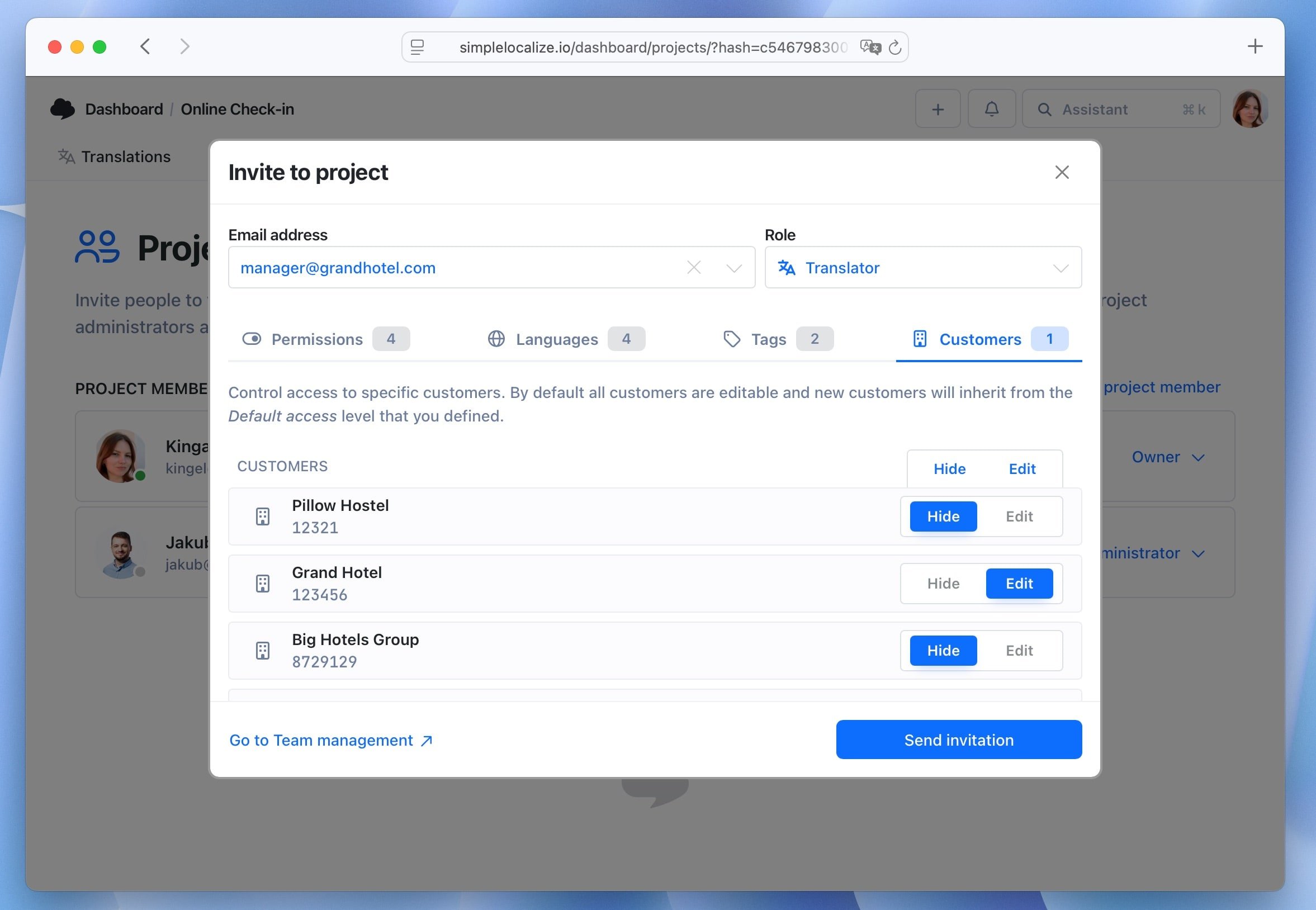
When you invite a user to the project, you can set customer context access for that user. Each customer context can be editable, view only, or hidden. Combined with the Change customer translations and Review customer translations permissions and with language access, this lets you invite a tenant's own staff to edit their overrides. They do not see other customers' translations, and they cannot change your base text.
Recover from mistakes
Customer contexts are included in project backups and automated snapshots. A snapshot is created before large changes, including deleting a customer context, so a wrong click during tenant cleanup can be reverted. For a single wrong edit, open the translation history of that customer translation and apply the previous version.
Common mistakes in multi-tenant localization
The most common mistakes include:
- Copying the full file for each tenant. It works for three tenants and fails at thirty. Store differences only.
- Putting the tenant in the key name.
button.book.grand-hotelties your code to your customer list and breaks key extraction. - Hardcoding tenant checks in components.
if (tenant === "grand-hotel")around text is a translation override written in the wrong place. - Caching by language only. One shared cache entry for
enwill serve the wrong tenant's text. - Using display names as IDs. A rename breaks every URL and file name.
- Creating a layer for every tenant. Tenants with zero overrides should use the base files.
- Skipping review for tenant-written text. Missing placeholders and long strings break layouts in production.
- Forgetting new languages. A tenant's glossary has to be applied again each time you add a language.
Design checklist
Before you build or buy a multi-tenant localization system, check that you can answer these:
- Where are tenant differences stored, and is only the difference stored?
- What is the exact fallback order across tenant and language?
- Where does the tenant ID come from, and is it stable and URL-safe?
- Where are the layers merged: client, server, or publish time?
- Does every cache key contain the tenant ID?
- What does the app do for an unknown tenant or a missing file?
- Who can edit base text, who can edit overrides, and who reviews them?
- What happens to overrides when base text, placeholders, or keys change?
- How is a tenant's layer created on onboarding and removed on offboarding?
Conclusion
Multi-tenant localization adds one dimension to every translation lookup: the tenant. The design that holds up as you grow is a shared base with a sparse override layer per tenant, a written fallback order, files merged at publish time, and the tenant ID in every cache key. Add clear permissions and a review step for overrides, and tenant-specific wording becomes a routine request instead of an engineering project.
In SimpleLocalize, that design maps directly to customer contexts and customer translations: one project, base translations for everyone, and a separate layer per customer that you can edit in the translation editor, manage through the API and CLI, and fetch from Translation Hosting with one URL. To try it on your own product, follow the customer translations documentation or read our walkthrough of customer-specific translations.