How to prepare your website for AI translation (LLMs & MT)


AI translation used to mean one thing: pasting text into Google Translate and hoping for the best. That's no longer how good teams do it.
The current approach is a hybrid workflow: a large language model or machine translation engine produces the first draft, a glossary keeps your terminology locked and consistent, and a human reviewer signs off on anything that matters for brand voice or legal accuracy. Each part does a different job, and skipping one usually shows up later as inconsistent tone or a translation that quietly drifted between runs.
Getting good output from this workflow starts before you ever click "translate". It starts with how your copy is written and how your codebase is structured. This guide covers both: the copywriting habits that make source text easier to translate, and the i18n patterns that give an LLM enough structure to translate correctly the first time. For the wider picture on how LLMs, MT engines, and QA fit together, see our AI and machine translation guide.
Part 1: Writing copy that AI translates well
Source text quality is still the single biggest factor in translation quality, AI or human. A model can only work with the ambiguity you give it.
Keep sentences short and literal
Long, clause-heavy sentences give a model more chances to misread intent. Short, direct sentences translate more predictably across languages, especially ones with very different sentence structures than English (German, Japanese, Finnish).
- Write one idea per sentence.
- Use relative pronouns ("that", "which") instead of dropping them, so the sentence structure stays explicit.
- Prefer active voice. "The team reviews translations" is easier to translate correctly than "Translations are reviewed by the team".
- Pick words with a single common meaning where you can. "Home" as a navigation label and "home" as a house are the same word and different translations in most languages.
Avoid idioms, humor, and culture-bound references
"Hit the ground running" or "ballpark figure" rarely have a natural equivalent in another language, and an LLM will often translate them literally, producing something nonsensical. Sports metaphors, regional pop-culture references, and wordplay in headlines are the most common source of this. If a line depends on a pun or a cultural reference to land, treat it as transcreation rather than translation, and route it to a human from the start.
Plan for text expansion
Translated text is very often longer than the English source. German and Finnish can run 30 to 40% longer; some Finnish compound words won't wrap at all inside a fixed-width container. Two things help here on the copy side:
- Set a rough character budget for UI labels, buttons, and navigation items, and write the English source with room to spare.
- Avoid cramming two ideas into one short label just because it fits in English. A label that's already tight in English has nowhere to go once translated.
The layout side of this problem (CSS, containers, soft hyphenation) is covered in our guide on why text expansion breaks UI layouts and how to fix it.
Part 2: Developer and i18n best practices for AI translation
This is where most translation quality problems actually start, and where most teams spend the least amount of attention. An LLM translating a well-structured JSON file with context will consistently outperform the same model translating raw, split, or ambiguous strings, regardless of which provider you use.
Never split a sentence across multiple keys
String splitting happens when a value gets injected into the middle of a sentence and a developer breaks the string into fragments to make room for it:
{
  "FROM": "From",
  "PER_NIGHT": "per night"
}
Translated independently, FROM and PER_NIGHT lose the grammatical relationship that made them a sentence in English. In languages with case declension or different word order, this often produces text that's grammatically wrong even when each fragment is translated correctly on its own.
Use a placeholder instead, and keep the sentence whole:
{
  "ROOM_PRICE": "From {roomPrice} per night"
}
This is the single highest-leverage fix in this whole guide. It costs nothing to do correctly from the start and is expensive to unwind later.
Use ICU message format for plurals and variables
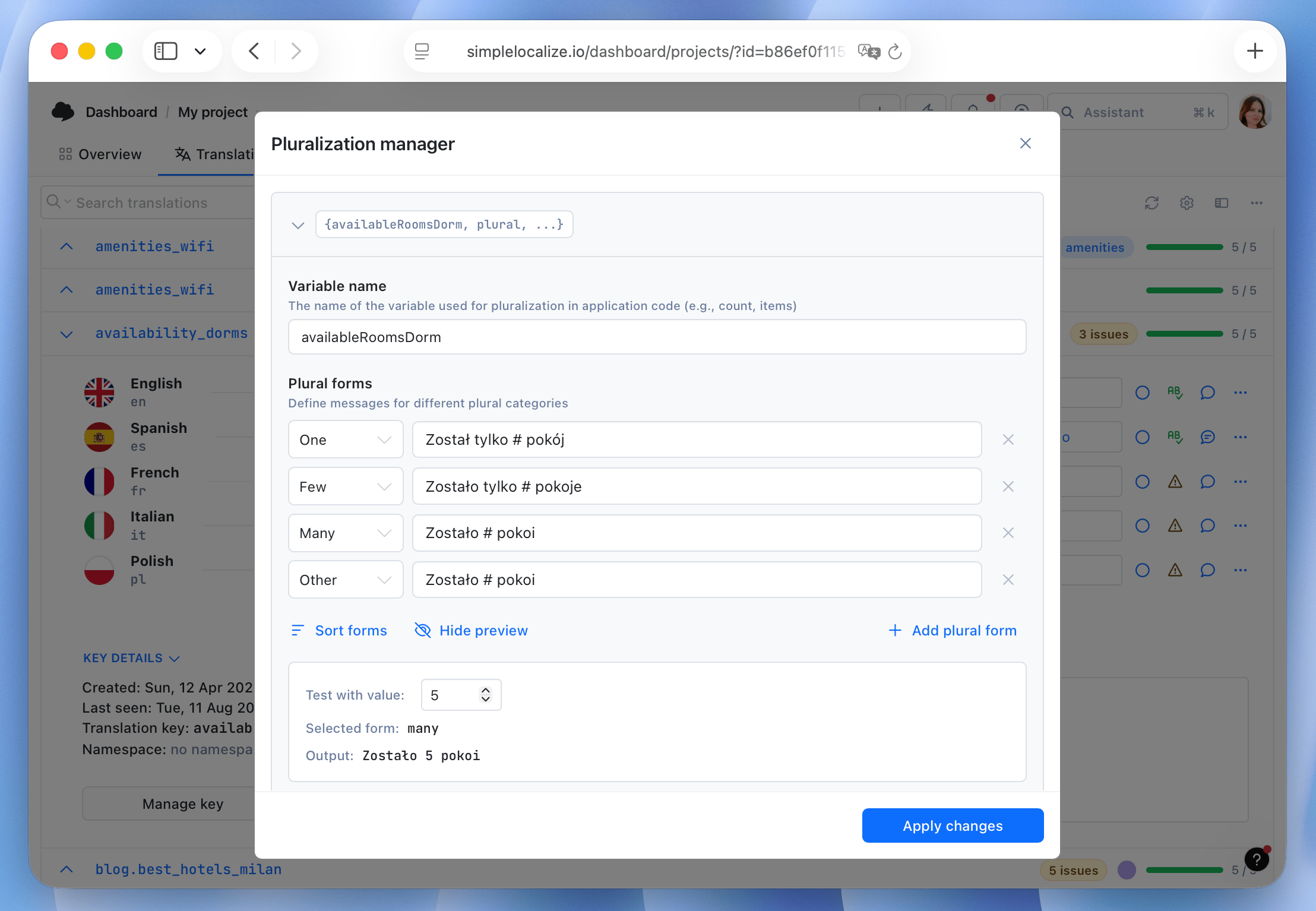
English has two plural forms. Polish has three, Arabic has six. If your translation format doesn't support proper plural rules, you'll either ship "1 items" style bugs or ask translators to hack around it with string concatenation.
The ICU message format handles this natively:
{count, plural,
  one {You have # unread message}
  other {You have # unread messages}
}
A translator (or an AI model translating with ICU awareness) fills in the correct plural categories for their language without touching your application code. This also applies to gendered forms and select statements, not just numbers. Most modern i18n libraries (i18next, FormatJS, vue-i18n) support ICU out of the box, so the fix is usually a matter of using it consistently, not adding a new dependency.
Keep markup out of translatable strings where you can
Embedding HTML tags inside a translation string works, but it adds risk: a model can drop a closing tag, translate the tag content, or move an emphasis tag to the wrong word for the target language's word order.
| Approach | Example | Risk |
|---|---|---|
| Inline HTML in the string | "Click <b>here</b> to continue" | Tags can be dropped, mistranslated, or misplaced in languages with different word order |
| Split into components | t("continue.prompt") + <b>{t("continue.action")}</b> | No markup to preserve, but loses inline emphasis flexibility |
| Rich-text placeholders | "Click {link} to continue", with {link} rendered by the app | Keeps the sentence whole and the markup out of the translated string |
For simple emphasis or a single link, rich-text placeholders (supported by FormatJS and most modern i18n libraries) are usually the safest middle ground. Save raw inline HTML for cases with no other option, and flag those keys for human review rather than trusting auto-translation with them by default.
Build a glossary and a do-not-translate list
Product names, feature names, and brand terminology should never go through the general translation process. Two tools handle this:
- Do-not-translate (DNT) list: words or phrases the AI should leave untouched entirely, typically proper nouns and your own product name.
- Glossary: terms that should always translate to a specific, approved word in each language, rather than whatever the model would default to. This matters most for product-specific vocabulary ("workspace", "project", "key") where a generic translation would confuse users familiar with your UI.
In SimpleLocalize, you can set up excluded words so the AI treats them as proper names, and use a glossary to enforce consistent terminology across auto-translated content. Set both up once per project and they apply to every translation run, so you don't have to remember to add them each time.

Pass context, not just raw strings
The biggest quality gap between "pasting text into ChatGPT" and a proper AI translation workflow is context. A raw string like "Home" is ambiguous. The same key with metadata is not:
{
  "key": "HOME_NAV_BUTTON",
  "source": "Home",
  "description": "Navigation button label, not a building",
  "characterLimit": 12,
  "tags": ["ui", "navigation"]
}
Project-level context (what the product is, who it's for, what tone to use) combined with key-level descriptions removes most of the ambiguity before the model starts, and it's the difference between a translation you can publish directly and one that needs a full review pass. Read more on how context improves AI translation quality.
Give ambiguous keys a screenshot
Some keys stay ambiguous no matter how good the description is, usually short labels reused in different places ("Cancel", "Continue", "Done"). Where your tooling supports it, attaching a screenshot of the key in its actual UI location gives both human translators and vision-capable models the context that text alone can't provide. This is worth doing selectively, on your highest-traffic and most reused keys, rather than across an entire project.

Reviewing AI output before it ships
Even with good source copy, clean i18n structure, glossaries, and context, AI translation still benefits from a review pass, particularly for anything customer-facing in a regulated industry or a market where tone matters (legal disclaimers, pricing pages, onboarding copy).
When you hand translations to a reviewer, give them:
- The context and function of the key (button label vs. heading vs. footnote), since the same English text can translate differently depending on where it appears
- The intended tone and formality level for that language
- A character count comparison, so unusually long or short translations get a second look Structured QA checks and review statuses let you route only the translations that need eyes on them, instead of manually re-reading everything after every AI translation run.
Getting started
None of this requires rebuilding your localization setup from scratch. Start with the placeholder and string-splitting fix, since it's free and prevents the most visible bugs. Then add a glossary and DNT list for your product terminology, and start passing project-level context on your next translation run.
Upload your source keys to SimpleLocalize, connect your preferred AI model (OpenAI, Claude, Gemini, or any model via OpenRouter), and run auto-translation with context, glossary, and caching already built into the workflow. Start for free and translate your first batch of keys in minutes.