Translate Android
strings.xml Files
Upload your strings.xml resource files, translate strings, plurals and arrays in one editor, and download straight into values-{lang}/ folders.
<?xml version="1.0" encoding="utf-8"?>
<resources>
    <!-- Home screen -->
    <string name="hello_world">Witaj Świecie!</string>
    <string name="welcome"><![CDATA[Witaj <b>%s</b>!]]></string>
    <string name="app_name" translatable="false">SimpleLocalize</string>

    <!-- Search results -->
    <plurals name="numberOfSongsAvailable">
        <item quantity="one">Znaleziono %d piosenkę.</item>
        <item quantity="few">Znaleziono %d piosenki.</item>
        <item quantity="other">Znaleziono %d piosenek.</item>
    </plurals>

    <!-- Onboarding -->
    <string-array name="onboarding_steps">
        <item>Utwórz konto</item>
        <item>Dodaj język źródłowy</item>
        <item>Prześlij plik strings.xml</item>
    </string-array>
</resources>
More than key-value pairs
A strings.xml file holds three different element types, not just simple strings: plain <string> entries, <string-array> lists, and <plurals> blocks where each language needs a different number of quantity variants: English uses two (one, other), Polish needs four. Getting the plural count wrong is a common way Android translations break silently, so on import SimpleLocalize converts each <plurals> block into a single ICU-format translation key instead of several loose strings.
Positional placeholders like %1$s and %d also have to stay in the exact position the layout expects, and text with markup Android doesn't natively support gets wrapped in <![CDATA[...]]> automatically on export so the XML stays valid.
{COUNT, plural,
  one {Znaleziono %d piosenkę.}
  few {Znaleziono %d piosenki.}
  other {Znaleziono %d piosenek.}
}
The details that break silently
Handled the way Android Studio expects
Small formatting rules cause most of the real-world bugs in translated Android apps. SimpleLocalize follows them automatically.
Per-language plural rules
Each language only shows the quantity categories it actually has: two for English, up to six for Arabic.
Comments as context
XML comments placed above a <string> tag are imported as translator context automatically.
translatable false, respected
Strings marked non-translatable are left untouched by auto-translation, matching Android's own attribute.
Namespaces for split files
Projects that split strings.xml by feature can manage each file separately using namespaces.
End-to-end workflow
Translate a strings.xml file end to end
Follow these steps to translate a strings.xml file from start to finish using SimpleLocalize.
simplelocalize upload \
  --apiKey PROJECT_API_KEY \
  --uploadLanguageKey en \
  --uploadFormat android-strings \
  --uploadPath ./values/strings.xml
Upload your default resource file
1values/strings.xml file, or drag it into the web editor. Strings, plurals and string-arrays are all recognized on import.one: Znaleziono %d piosenkę.
few: Znaleziono %d piosenki.
many: Znaleziono %d piosenek.
other: Znaleziono %d piosenek.Review plurals per language
2✓ welcome placeholders match
✓ hello_world translated
⚠ onboarding_steps.2 length +40% vs sourceAuto-translate and QA
3simplelocalize download \
--apiKey PROJECT_API_KEY \
--downloadFormat android-strings \
--downloadLanguageKey pl,de,es \
--downloadPath ./values-{lang}/strings.xml \
--downloadOptions ONLY_TRANSLATEDDownload into values-{lang}/
4ONLY_TRANSLATED option so incomplete languages fall back correctly at runtime.For developers
A localization platform,
built around your resource files
Beyond a clean import and export, SimpleLocalize gives your team a real workflow around Android translations.
Cross-platform placeholders
Convert native Android placeholders into a platform-independent format, so the same translation exports correctly to iOS too.
Skip strings that shouldn't translate
Non-translatable strings are respected and left out of auto-translation, exactly as Android's own attribute intends.
AI auto-translation
Translate new strings, plurals and array items with DeepL, Google Translate, OpenAI, Claude or Gemini in one click.
CLI, API and CI/CD
Sync translations from the CLI or REST API, so a build pipeline can pull the latest strings automatically.

More conversions
Convert Android XML to other formats
Free online converter, no account required. Upload a strings.xml file and download it in the format you need.
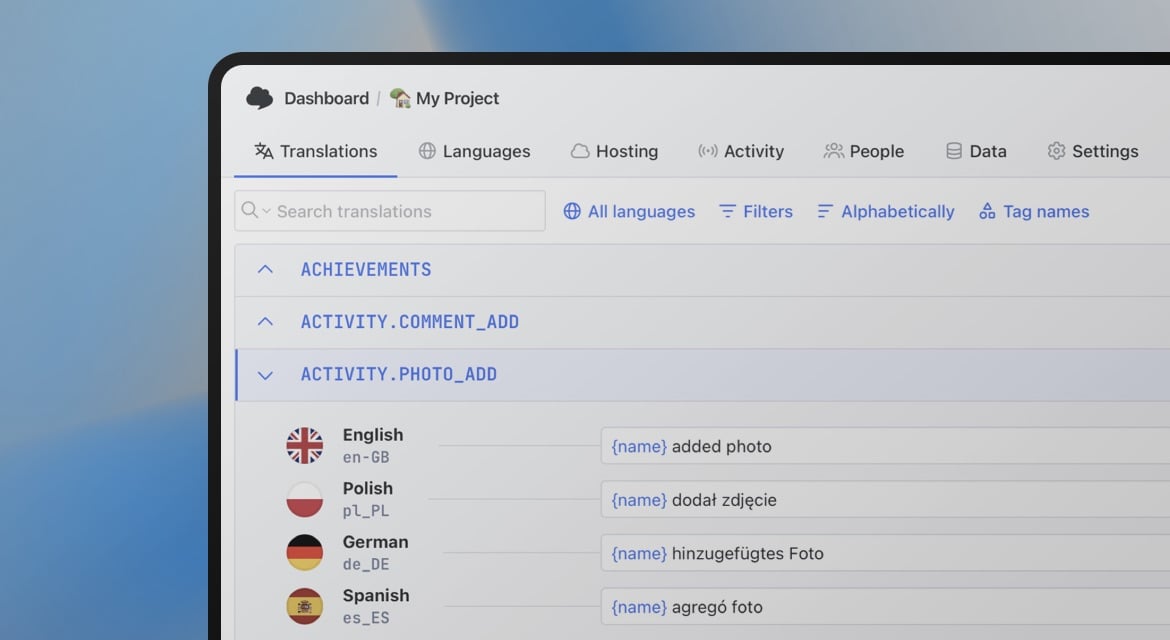
Start translating Android resources
- Strings, plurals and string-arrays in one editor
- Universal placeholders for cross-platform exports
- Exports straight into values-{lang}/strings.xml
"The product
and support
are fantastic."
"The support is
blazing fast,
thank you Jakub!"
"Interface that
makes any dev
feel at home!"
"Excellent app,
saves my time
and money"
Related articles
More on localizing Android apps.
Android String resources: Complete guide to localizing Android apps
Learn how to manage Android string resources, plurals, and arrays. A technical guide to localizing Android XML files with SimpleLocalize for seamless translation workflows.
Frequently asked questions about Android strings.xml
Does SimpleLocalize handle Android plurals correctly?
Yes. Plural blocks are converted to a single ICU-format key on import, and each language's translation view only shows the plural quantities that language actually needs.
What about untranslated keys in the exported file?
By default, every key is exported, even without a translation, as an empty <string> tag. If the file will ship in your app, add the ONLY_TRANSLATED download option so missing keys are left out and Android's own fallback to values/strings.xml keeps working.
Are string-array and CDATA-wrapped values supported?
Yes. Array items are editable individually as separate keys, and markup outside Android's supported style tags is wrapped in CDATA automatically on export.
Can I import files from multiple values-{lang} folders at once?
Yes, either through the web editor or by pointing the CLI at your project's values-{lang}/strings.xml paths directly.