Catch translation bugs
before your users do
Automated QA checks that run in real time as you translate. Detect missing placeholders, broken HTML, length overflows, and 30+ other issues before they reach production.
We power your product localization
From first commit to global launch


What QA checks catch
Stop these bugs from reaching production
Over 30 automated checks run on every translation change — in the editor, via API, CLI, and integrations. Here are the most common issues they prevent.
Missing placeholders
Ensure {name}, %s, or {{count}} is never accidentally deleted by a translator. Broken variables mean broken UI.
Broken HTML tags
Catch unclosed <b>, <a>, or <span> tags that break your layout or produce invalid markup in production.
Length constraints
Flag translations that exceed character limits — critical for mobile buttons, push notifications, and fixed-width UI.
Leading & trailing spaces
Avoid accidental UI shifts and alignment issues caused by extra whitespace at the start or end of a translation.
Inconsistent punctuation
Detect missing or mismatched periods, exclamation marks, colons, and ellipses between source and translation.
Capitalization issues
Spot translations where the first letter casing doesn't match the source pattern, keeping button labels and headings consistent.
QA checks in the editor
Catch issues live as you translate
QA checks run in real time as you edit translations in the SimpleLocalize editor.
Real-time validation
as you translate
QA checks run live as you type, no separate validation step. Issues are highlighted inline with the exact problem description, so translators catch and fix errors immediately instead of discovering them after release.
See all check types in the docsAI-powered fixes
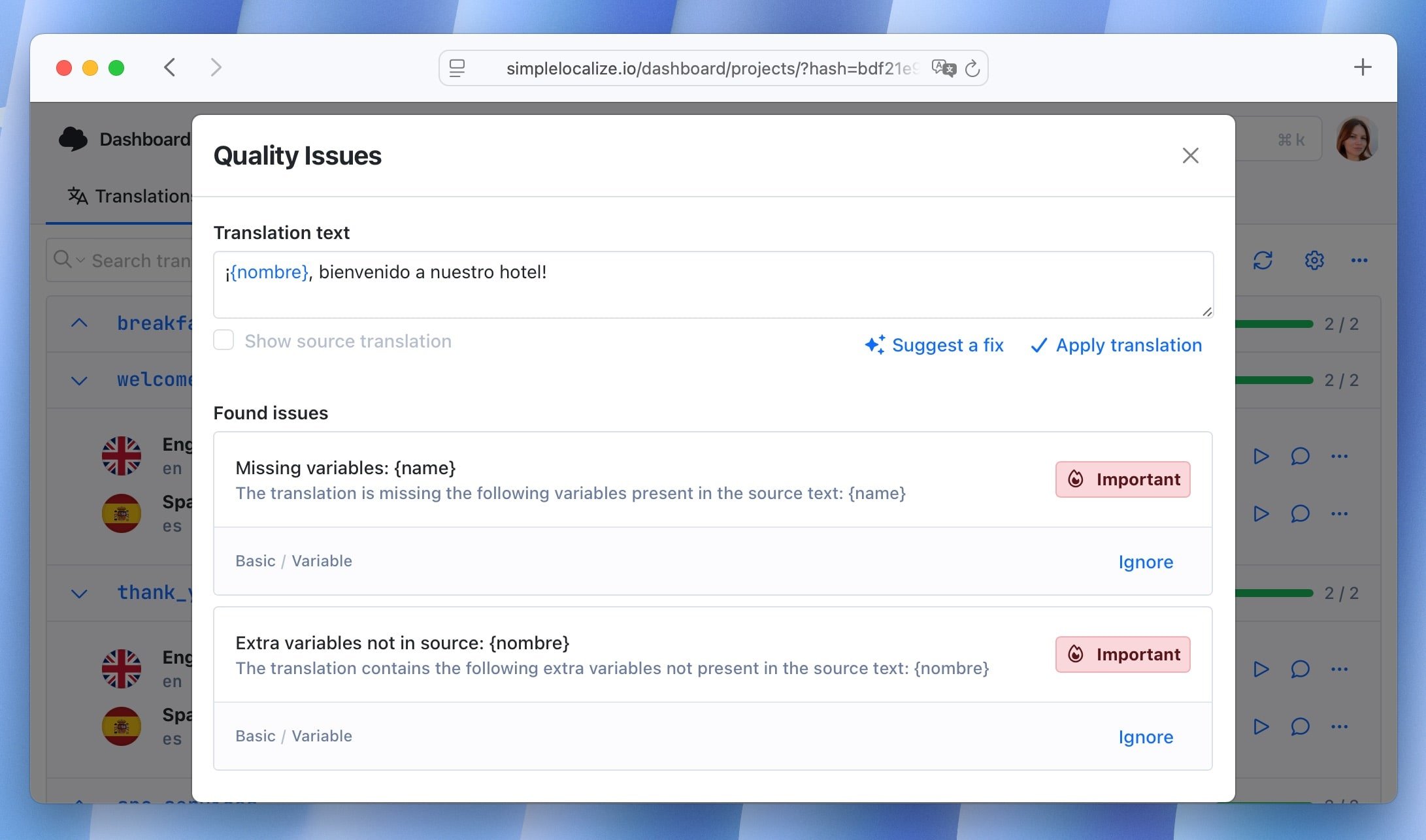
Don't just flag problems, fix them. Click "Suggest a fix" on any QA issue and the AI analyzes the context to propose an accurate correction. Apply it with one click, or fix all issues for a key at once. Suggestions don't consume your auto-translation credits.
Learn about AI-powered fixesDetailed issue panel
Open the Quality Issues panel to see every detected problem for a translation key, grouped by severity and type. Ignore false positives, track ignored issues separately, and re-run checks project-wide at any time from the editor menu.
How it works
QA checks run everywhere
Quality checks are not limited to the editor. They run on every translation change, whether it comes from the web editor, API, CLI import, or auto-translation.
Checks run live as you type. Issues appear inline with suggested fixes.
Import translations via CLI and QA checks flag issues before they're merged.
Create or update translations via API, checks run automatically on every write.
AI and machine translations are validated immediately after generation.
Full control
Configure checks per project
Enable or disable individual check types from project settings. Ignore false positives on specific translations without turning off the entire check category. Re-run all checks at any time to re-evaluate after rule updates.
All checks are implemented in-house, your translations are never sent to third-party services for analysis. AI-powered fix suggestions use in-house models first, with OpenAI as fallback.

Part of the platform
QA checks in your localization workflow
QA checks are built into the SimpleLocalize TMS. Combined with the translation editor, review process, and automations, they form a quality gate that prevents broken translations from ever reaching your users.
Editor integration
Issues appear inline as you edit. Fix them in place without leaving the translation view.
Review workflow
Reviewers see QA issue counts per key. Approve only translations that pass all checks.
Publish with confidence
Ship translations knowing that placeholders, tags, and length constraints are all validated.
Stop shipping broken translations
- 30+ automated checks on every translation change
- AI-powered fix suggestions, no credits consumed
- Real-time validation in the editor, API, and CLI
- Configure checks per project, ignore false positives
- Part of the SimpleLocalize translation management platform
"The product
and support
are fantastic."
"The support is
blazing fast,
thank you Jakub!"
"Interface that
makes any dev
feel at home!"
"Excellent app,
saves my time
and money"
Translation quality guides
Articles on translation QA, quality assurance workflows, and preventing localization bugs.
11 common localization mistakes (and how to avoid them)
Learn the most common localization mistakes teams make and how to avoid them with practical tips, real examples, and SimpleLocalize best practices.

What is pseudo-localization? A practical guide for localization testing
Learn what pseudo-localization is, why it matters, and how to use it to catch localization issues early. Practical examples and tips for pseudo-localization.

Language selector best practices: 10 UX tips for websites and apps
Learn how to design an effective language selector for your website or app. Improve user experience, accessibility, and internationalization with these expert tips.

Localization in e-commerce: A practical guide for growing online stores
Learn what e-commerce localization really means, why it impacts conversions and SEO, and how to localize Shopify and Webflow stores effectively.
How to choose the right TMS for continuous localization
A practical guide to selecting the right translation management system (TMS) for continuous localization. Learn what to evaluate, real examples, and how SimpleLocalize fits in.
How to manage product translations on Shopify (Step-by-step guide)
Learn how to manage Shopify product translations using SimpleLocalize. Translate product titles, descriptions, and variants efficiently and keep content updated across languages.
What are translation QA checks?
Translation QA checks are automated validations that detect errors in translated strings — missing placeholders, broken HTML tags, length overflows, inconsistent punctuation, and more. In SimpleLocalize, they run in real time on every translation change: in the online editor, via the REST API, CLI imports, and auto-translation. Over 30 check types are implemented in-house, with no third-party dependencies.
How AI-powered fix suggestions work
When a QA issue is detected, you can click "Suggest a fix" to get an AI-generated correction. The AI analyzes the source text, the translation context, and the specific issue type to propose an accurate fix. Suggestions are powered by in-house models first, with OpenAI as fallback. Fix suggestions don't consume your auto-translation character credits — they're included in every plan.
Configuring QA checks for your project
QA checks are active by default. You can enable or disable individual check categories in project settings under the QA Checks tab. If a check produces a false positive on a specific translation, you can ignore it without disabling the check globally. Ignored issues are tracked separately and can be reviewed later. You can also re-run all checks manually from the editor menu to re-evaluate translations after rule updates.
What types of issues do QA checks detect?
QA checks detect over 30 issue types including missing variables and placeholders ({name}, %s, {{count}}), unclosed or mismatched HTML tags, translations exceeding character limits, leading and trailing whitespace, inconsistent punctuation and capitalization, Unicode problems, and ICU message format errors.
Do QA checks run only in the editor?
No. QA checks run on every translation change regardless of the source — the web editor, REST API, CLI import, or auto-translation. This means translations imported via CI/CD or generated by AI are validated automatically.
Are my translations sent to third-party services for QA analysis?
No. All QA checks are implemented in-house and run directly in your browser or on SimpleLocalize servers. Your translations are never sent to external services for analysis. AI-powered fix suggestions use in-house models first, with OpenAI as a fallback only when needed.
Do AI fix suggestions consume auto-translation credits?
No. Fixing translations with 'Suggest a fix' does not use your auto-translation character credits. AI-powered fix suggestions are included in every plan at no additional cost.
Can I disable specific QA checks?
Yes. Go to project Settings > QA Checks to enable or disable individual check categories. You can also ignore specific issues on individual translations without disabling the entire check type. Ignored issues are tracked in a separate list for review.
How do QA checks work with the review process?
QA issue counts are visible per translation key in the editor. Reviewers can use this as a quality signal — approving only translations that pass all checks. Combined with tasks and the review workflow, QA checks act as an automated quality gate before translations are published.