How to plan localization for your first 5 languages (SaaS guide)


Choosing your first five languages is not a translation decision. It's a growth strategy decision.
At this stage, localization can either accelerate international traction, or quietly drain time and budget without measurable return.
The difference lies in how deliberately you plan it.
If you've reviewed the fundamentals in our localization strategy guide, this article focuses on practical decision-making:
- How to choose the right first languages
- How to validate demand before investing
- How to model localization costs realistically
- And when not to localize at all
Because sometimes the smartest move is to wait.
1. Start with markets, not languages
The common mistake?
"We should translate into Spanish."
Why Spanish?
Because it's widely spoken.
But that's not strategy. That's assumption.
Instead, ask:
- Where are signups already coming from?
- Which countries show high trial activity but low paid conversion?
- Where are support tickets coming from in non-English markets?
- Which regions align with your ICP and pricing model?
Example:
A B2B SaaS tool sees growing traffic from France and the Netherlands. France shows strong engagement but low paid conversion. That's a stronger signal than choosing a language based on global speaker count.
Language selection should follow market validation, not the other way around.
2. How to choose your first languages: structured criteria
Once you've identified promising markets, evaluate languages against consistent criteria.
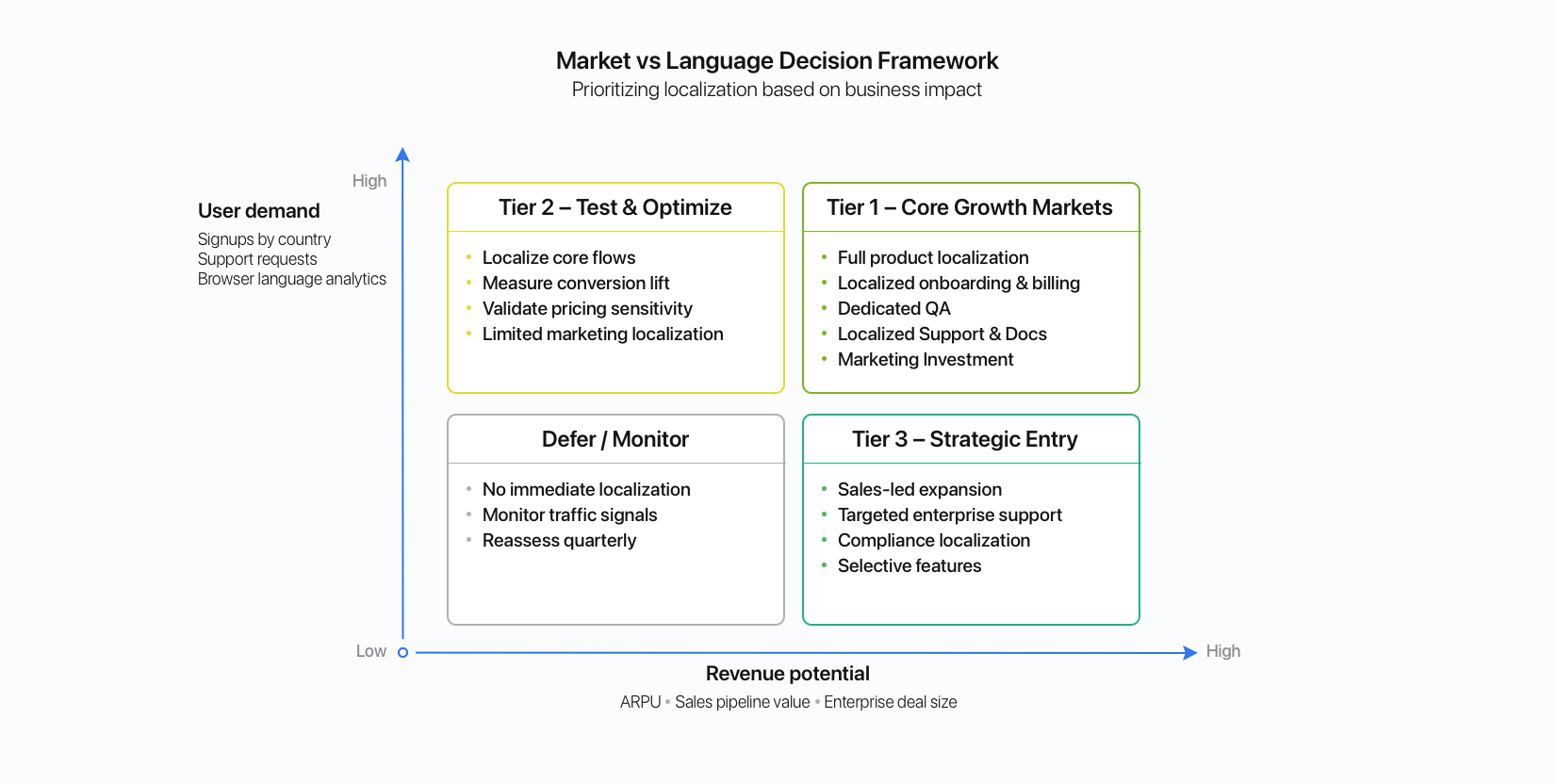
A. Revenue potential
- Market size for your SaaS category
- Purchasing power
- Competitive saturation
- Average deal size in that region
A smaller language in a high-value market may outperform a globally spoken language with low purchasing power.
B. Existing user demand signals
Look for behavioral evidence:
- % of traffic from non-English browser settings
- High bounce rates in specific countries
- Repeated support tickets asking for translation
- Sales calls requesting local-language demos and contracts
If demand is already there, localization becomes risk reduction, not speculation.
C. Multi-market leverage
Some languages unlock multiple revenue regions:
- Spanish: Spain + LATAM
- Portuguese: Brazil
- German: Germany + Austria
- French: France + parts of Canada, Belgium
However, don't assume one variant fits all markets. es-ES and es-MX may require different pricing logic, tone, and compliance adjustments.
Learn more about language variants and locales in our language vs locale guide.
Language reach doesn't always equal market reach. Validate the specific markets you want to target within that language.
D. Operational readiness
Even validated markets can fail if you're not ready operationally. Ask:
- Can you support customers in that language?
- Do you have review capacity for translations?
- Is your product technically prepared (date formats, pluralization, locale logic, RTL if needed)?
- Can your workflow scale beyond five languages?
If you're unsure, assess your foundation using the localization readiness checklist.
Launching prematurely creates hidden maintenance costs and customer frustration.
3. Validate before fully localizing
Full product localization is expensive. Validation doesn't have to be.
Before translating your entire UI, test the market response.
Practical validation methods
-
Localized landing pages
Translate high-intent landing pages and run paid campaigns targeting specific countries. Measure:
- Conversion rate
- Cost per acquisition
- Trial-to-paid conversion lift
If localized pages outperform English pages in that market, that's real signal.
-
Partial product localization
Localize only:
- Onboarding flow
- Pricing page
- Key feature flows
You don't need 100% translation to test willingness to pay. If users convert better with partial localization, that's a strong indicator.
-
Sales and demo experiments
Offer localized demos or translated proposals to qualified prospects.
If deals close faster when presented in local language, ROI becomes measurable.
-
Direct customer interviews
Ask:
- Would you prefer the product in your language?
- Does English create friction?
- Is billing clarity an issue?
Qualitative feedback prevents wrong assumptions.
Example:
A SaaS team localizes only their pricing page and onboarding flow into Italian. Conversions improve significantly, justifying full product localization later.
Validation reduces risk and improves prioritization for your first five languages.
4. Cost modeling: What localization really costs
Many teams estimate localization as:
Word count x cost per word.
That's incomplete.
A realistic cost model includes:
Direct costs
- Translation (per word or per string)
- Review and proofreading
- Ongoing updates
- Terminology management
Technical costs
- Engineering implementation
- CI/CD integration
- Localization QA
- Testing across environments
Operational costs
- Customer support expansion
- Documentation updates
- Marketing localization
- Sales materials
Now multiply that by five languages, and then by continuous product updates.
This is where structured translation workflows, translation memory, and automation reduce long-term cost. The first launch is expensive, but subsequent updates should be more efficient.
Localization ROI improves when processes mature.
5. When not to localize yet
Localization amplifies what already exists. If your core product experience isn't stable, localization will amplify instability.
Do not localize yet if:
- You haven't reached product-market fit
- Your churn rate is unstable
- Your UI changes weekly
- You lack proper internationalization (i18n)
- You can't support customers in that language
If your codebase isn't prepared for proper locale handling, formatting rules, or plural rules, fix that first. Review your internationalization (i18n) setup before expanding.
Sometimes delaying localization improves long-term ROI.
6. How many languages should you launch with?
Five is not a rule. It's a planning framework.
A practical roadmap many SaaS teams follow:
- Language 1-2: High-demand, revenue-proven markets
- Language 3-4: Strategic growth regions with measurable signals
- Language 5: Controlled experiment to validate expansion model
Avoid launching all five simultaneously if:
- Your team lacks localization ownership
- Your process isn't automated
- You haven't validated update workflows
It's better to launch two successfully than five chaotically.
7. Think beyond the first launch
Choosing your first languages is only step one.
Before committing, ask:
- How quickly can we add a sixth language?
- Can our system scale from 5 to 15 without rebuilding?
- Do we have governance for terminology and tone?
- Are we tracking ROI by locale?
Planning for scale prevents painful rework later.
Localization should feel incremental, not overwhelming.
Conclusion
Your first five languages shape your international expansion trajectory.
Choose them based on:
- Market validation
- Revenue opportunity
- Operational readiness
- Sustainable cost modeling
Not global speaker popularity.
Deliberate localization creates leverage.
Reactive localization creates complexity.
If you want a broader strategic view, revisit the localization strategy guide and align your language decisions with long-term global growth.