Handling dates, times, numbers, and currencies in i18n

Hardcoded date formats and number separators are among the most common i18n mistakes teams make. They're easy to miss because the app looks perfectly correct in English, and completely broken the moment you add German, Arabic, or Japanese.
This post covers the full picture: dates, times, time zones, numbers, currencies, and a few edge cases that catch teams off guard. For a broader look at i18n architecture, translation keys, and framework integration, see the complete technical guide to internationalization and software localization.
Why locale-aware formatting matters
The instinct is to use new Date().toLocaleDateString() or template literals like ${month}/${day}/${year} and call it done. Both work fine for US English. Neither works for the rest of the world.
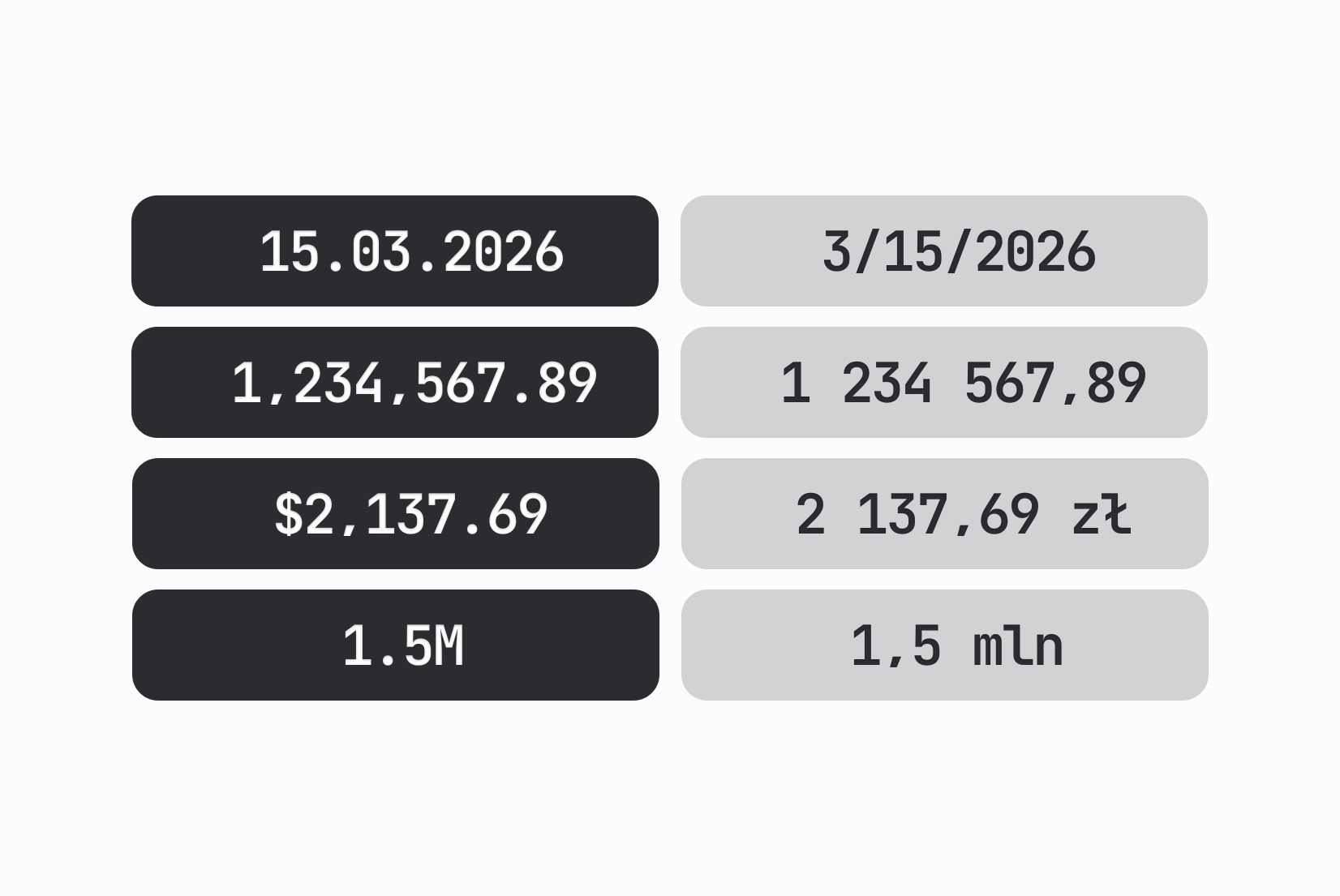
Date format conventions vary dramatically:
| Locale | Format | Example |
|---|---|---|
US English (en-US) | MM/DD/YYYY | 03/15/2026 |
Polish (pl-PL) | DD.MM.YYYY | 15.03.2026 |
Japanese (ja-JP) | YYYY年MM月DD日 | 2026年03月15日 |
Hungarian (hu-HU) | YYYY. MM. DD. | 2026. 03. 15. |
| ISO 8601 | YYYY-MM-DD | 2026-03-15 |
A Polish user looking at 03/15/2026 reasonably reads it as the 3rd of the 15th month, which doesn't exist. A Japanese user expects the year first. Hungarian adds dots and spaces in a way most developers wouldn't guess.
The same problem applies to numbers. 1,000.50 means one thousand and fifty cents in English. In German, it means one point zero zero zero comma fifty, which is still one thousand, but if you wrote it in a financial context for a German user, they'd distrust your product.
The fix is always the same: use the platform's locale-aware formatting APIs instead of constructing strings manually.
Dates and times in JavaScript
JavaScript's Intl.DateTimeFormat is the right tool here. It's built into every modern browser and Node.js runtime, requires no third-party dependencies, and handles the full range of regional conventions.
Basic date formatting
const date = new Date('2026-03-15');

// US English
new Intl.DateTimeFormat('en-US').format(date);
// → "3/15/2026"

// Polish
new Intl.DateTimeFormat('pl-PL').format(date);
// → "15.03.2026"

// Japanese
new Intl.DateTimeFormat('ja-JP').format(date);
// → "2026/3/15"

// Arabic (Saudi Arabia)
new Intl.DateTimeFormat('ar-SA').format(date);
// → "١٤٤٧/٩/١٥" (Hijri calendar by default)
The Arabic example is worth noting. Saudi Arabia defaults to the Islamic (Hijri) calendar, which means the year, month, and day are all different values from the Gregorian ones. If you're displaying a booking date, an invoice date, or anything date-sensitive to users in that region, you need to be aware of this.
dateStyle and timeStyle
For most use cases, dateStyle and timeStyle options give you clean, locale-appropriate output without specifying every field:
const date = new Date('2026-03-15T14:30:00');

new Intl.DateTimeFormat('en-US', { dateStyle: 'long', timeStyle: 'short' }).format(date);
// → "March 15, 2026 at 2:30 PM"

new Intl.DateTimeFormat('pl-PL', { dateStyle: 'long', timeStyle: 'short' }).format(date);
// → "15 marca 2026 o 14:30"

new Intl.DateTimeFormat('de-DE', { dateStyle: 'long', timeStyle: 'short' }).format(date);
// → "15. März 2026 um 14:30"

new Intl.DateTimeFormat('ja-JP', { dateStyle: 'long', timeStyle: 'short' }).format(date);
// → "2026年3月15日 14:30"
Available values for both options are 'full', 'long', 'medium', and 'short'. Use 'medium' as a safe default for most application UIs since it's specific enough to be unambiguous but doesn't produce very verbose output.
Granular control over fields
When you need specific fields, you can configure them individually:
const date = new Date('2026-03-15T14:30:00');

new Intl.DateTimeFormat('en-GB', {
  weekday: 'long',
  year: 'numeric',
  month: 'long',
  day: 'numeric',
}).format(date);
// → "Sunday, 15 March 2026"

new Intl.DateTimeFormat('pl-PL', {
  weekday: 'long',
  day: 'numeric',
  month: 'long',
  year: 'numeric',
}).format(date);
// → "niedziela, 15 marca 2026"
One thing to avoid: combining dateStyle/timeStyle with individual field options in the same call. The API will throw a TypeError. Pick one approach per formatter.
Relative time
The Intl.RelativeTimeFormat API formats phrases like "3 days ago" or "in 2 hours" in a locale-appropriate way:
const rtf = new Intl.RelativeTimeFormat('en-US', { numeric: 'auto' });

rtf.format(-1, 'day');   // → "yesterday"
rtf.format(-3, 'day');   // → "3 days ago"
rtf.format(1, 'week');   // → "next week"
rtf.format(2, 'month');  // → "in 2 months"
const rtf = new Intl.RelativeTimeFormat('pl-PL', { numeric: 'auto' });

rtf.format(-1, 'day');   // → "wczoraj"
rtf.format(-3, 'day');   // → "3 dni temu"
rtf.format(1, 'week');   // → "w przyszłym tygodniu"
rtf.format(2, 'month');  // → "za 2 miesiące"
The numeric: 'auto' option is what gives you "yesterday" and "tomorrow" instead of "-1 days" and "1 day". Without it, all values are numeric.
This API is particularly useful for activity feeds, notifications, and comment timestamps where you want to show relative time rather than absolute dates.
Time zones
Time zone handling is the part of date formatting that causes the most production bugs, because errors are often silent: the date displays, just in the wrong zone.
The fundamental rule: store UTC, display local
Always store timestamps as UTC in your database. Convert to the user's local time zone only at display time, never earlier in the pipeline.
// Storing: always UTC
const utcTimestamp = new Date().toISOString();
// → "2026-03-15T13:30:00.000Z"

// Displaying: convert to user's zone
new Intl.DateTimeFormat('pl-PL', {
  dateStyle: 'long',
  timeStyle: 'short',
  timeZone: 'Europe/Warsaw',
}).format(new Date('2026-03-15T13:30:00.000Z'));
// → "15 marca 2026 o 14:30"
// (Warsaw is UTC+1 in March, so 13:30 UTC → 14:30 local)
Named time zones vs UTC offsets
Always use IANA named time zones (Europe/Warsaw, America/New_York, Asia/Tokyo) rather than raw UTC offsets (UTC+1, +05:30).
UTC offsets don't account for daylight saving time. Europe/Warsaw is UTC+1 in winter and UTC+2 in summer. If you store UTC+1 and a user looks at an event in July, it will display one hour off. Named zones handle DST transitions automatically.
const event = new Date('2026-07-15T10:00:00.000Z');

// Wrong: raw offset, ignores DST
new Intl.DateTimeFormat('pl-PL', {
  timeZone: 'UTC+1', // fixed offset, not CEST
  timeStyle: 'short',
}).format(event);
// → "11:00" (always +1, even in summer when Warsaw is +2)

// Correct: named zone
new Intl.DateTimeFormat('pl-PL', {
  timeZone: 'Europe/Warsaw',
  timeStyle: 'short',
}).format(event);
// → "12:00" (correctly applies CEST, which is +2 in July)
Detecting the user's time zone
// Browser API, no library needed
const userTimeZone = Intl.DateTimeFormat().resolvedOptions().timeZone;
// → "Europe/Warsaw" (or whatever the user's system reports)
This is the right way to detect the user's time zone for display purposes. Store it in their profile or session if you need it server-side.
Numbers
Number formatting differences go beyond just the decimal separator. Grouping separators, digit grouping size, and digit characters all vary by locale.
The Intl.NumberFormat API
const value = 1234567.89;

new Intl.NumberFormat('en-US').format(value);
// → "1,234,567.89"

new Intl.NumberFormat('pl-PL').format(value);
// → "1 234 567,89"  (space as thousands separator, comma as decimal)

new Intl.NumberFormat('hi-IN').format(value);
// → "12,34,567.89"  (Indian grouping: 2-2-3 from the right)

new Intl.NumberFormat('ar-EG').format(value);
// → "١٬٢٣٤٬٥٦٧٫٨٩"  (Eastern Arabic numerals)
The Polish example is a good one to keep in mind: the space as a thousands separator and comma as decimal separator is a pattern shared by many European locales (French, Swedish, and others). It means 1 234 567,89 is correct in pl-PL, not a typo. Copy-pasting a formatted Polish number into a field expecting an English float will break your parser.
Controlling decimal places
const price = 1234.5;

new Intl.NumberFormat('en-US', {
  minimumFractionDigits: 2,
  maximumFractionDigits: 2,
}).format(price);
// → "1,234.50"

new Intl.NumberFormat('pl-PL', {
  minimumFractionDigits: 2,
  maximumFractionDigits: 2,
}).format(price);
// → "1 234,50"
Always set both minimumFractionDigits and maximumFractionDigits when working with prices to avoid displaying $10 when the value is 10.00.
Percentages
Percentage formatting also varies. In some locales the percent sign comes before the number; in others it comes after with a space.
const ratio = 0.7523;

new Intl.NumberFormat('en-US', { style: 'percent' }).format(ratio);
// → "75%"

new Intl.NumberFormat('fr-FR', { style: 'percent' }).format(ratio);
// → "75 %"  (French uses a space before the percent sign)

new Intl.NumberFormat('ar-SA', { style: 'percent' }).format(ratio);
// → "٧٥٪"  (Arabic numerals, different percent character)

new Intl.NumberFormat('tr-TR', { style: 'percent' }).format(ratio);
// → "%75"  (percent sign before the number)
For a deeper look at number and unit formatting with toLocaleString(), see our dedicated guide on number formatting in JavaScript.
Currencies
Currency formatting involves more decisions than number formatting: symbol vs code vs name, symbol placement, decimal conventions, and whether the currency even uses decimal subdivisions.
Basic currency formatting
const amount = 1234.5;

new Intl.NumberFormat('en-US', { style: 'currency', currency: 'USD' }).format(amount);
// → "$1,234.50"

new Intl.NumberFormat('pl-PL', { style: 'currency', currency: 'PLN' }).format(amount);
// → "1 234,50 zł"

new Intl.NumberFormat('ja-JP', { style: 'currency', currency: 'JPY' }).format(amount);
// → "¥1,235"  (Yen has no subunits, so decimals are rounded)

new Intl.NumberFormat('ar-SA', { style: 'currency', currency: 'SAR' }).format(amount);
// → "١٬٢٣٤٫٥٠ ر.س."

new Intl.NumberFormat('en-IN', { style: 'currency', currency: 'INR' }).format(amount);
// → "₹1,234.50"
The Yen example is important: JPY has no subdivisions (no cents), so Intl.NumberFormat correctly rounds to a whole number and omits the decimal. If you hardcode .toFixed(2) before formatting, you'll display ¥1,234.50 which looks wrong to a Japanese user and suggests a bug.
currencyDisplay options
const amount = 1234.5;

// Symbol (default)
new Intl.NumberFormat('en-US', { style: 'currency', currency: 'EUR', currencyDisplay: 'symbol' }).format(amount);
// → "€1,234.50"

// ISO code
new Intl.NumberFormat('en-US', { style: 'currency', currency: 'EUR', currencyDisplay: 'code' }).format(amount);
// → "EUR 1,234.50"

// Spelled out
new Intl.NumberFormat('en-US', { style: 'currency', currency: 'EUR', currencyDisplay: 'name' }).format(amount);
// → "1,234.50 euros"

// Narrow symbol (shortest possible)
new Intl.NumberFormat('en-CA', { style: 'currency', currency: 'USD', currencyDisplay: 'narrowSymbol' }).format(amount);
// → "US$1,234.50"  (distinguishes from CAD which also uses $)
The narrowSymbol option is useful when you need to distinguish between currencies that share a symbol in the same UI. If you're showing both USD and CAD amounts on the same page, a Canadian user seeing $ for both is confusing. narrowSymbol gives you US$ and CA$.
Currencies without decimal subunits
Some currencies have no subunits (JPY, KRW, VND), some have three decimal places (KWD, OMR, TND), and some have unusual subdivisions. Intl.NumberFormat knows these rules and applies them automatically, so you don't need to hardcode them.
const amount = 50000;

// Korean Won: no decimals
new Intl.NumberFormat('ko-KR', { style: 'currency', currency: 'KRW' }).format(amount);
// → "₩50,000"

// Kuwaiti Dinar: 3 decimal places
new Intl.NumberFormat('ar-KW', { style: 'currency', currency: 'KWD' }).format(50.123);
// → "٥٠٫١٢٣ د.ك."
Accounting notation
Financial applications often display negative numbers differently. In many regions, negative amounts are wrapped in parentheses rather than prefixed with a minus sign.
const loss = -1234.56;

new Intl.NumberFormat('en-US', {
  style: 'currency',
  currency: 'USD',
  currencySign: 'accounting',
}).format(loss);
// → "($1,234.56)"

new Intl.NumberFormat('en-US', {
  style: 'currency',
  currency: 'USD',
}).format(loss);
// → "-$1,234.56"
If you're building a finance dashboard, a payments product, or an invoicing tool and you're targeting markets where accounting notation is standard, currencySign: 'accounting' is the correct approach.
Compact notation
For dashboards, analytics UIs, and anywhere you need to show large numbers in limited space:
const value = 1500000;

new Intl.NumberFormat('en-US', { notation: 'compact' }).format(value);
// → "1.5M"

new Intl.NumberFormat('pl-PL', { notation: 'compact' }).format(value);
// → "1,5 mln"

new Intl.NumberFormat('ja-JP', { notation: 'compact' }).format(value);
// → "150万"  (万 = 10,000; Japanese groups in units of 10,000)

new Intl.NumberFormat('zh-CN', { notation: 'compact' }).format(value);
// → "150万"
The Japanese and Chinese results are worth paying attention to. These languages don't use millions and billions: the unit is 万 (10,000) and 億 (100,000,000). Intl.NumberFormat with notation: 'compact' handles this correctly, but if you're building a chart or analytics UI that only accounts for K/M/B suffixes, you'll need to think about how to handle the CJK grouping system.
Sorting locale-aware lists
Sorting is also locale-dependent, which catches teams off guard. JavaScript's default Array.prototype.sort() uses Unicode code point order, not linguistic sort order.
const cities = ['Łódź', 'Kraków', 'Gdańsk', 'Warszawa', 'Wrocław', 'Poznań', 'Zielona Góra'];

// Wrong: Unicode sort
// Ł (U+0141) and Ź (U+0179) are well above ASCII, so they sort after Z
cities.sort();
// → ["Gdańsk", "Kraków", "Poznań", "Warszawa", "Wrocław", "Zielona Góra", "Łódź"]
// Łódź ends up last when it should come between Kraków and Poznań

// Correct: locale-aware sort
cities.sort(new Intl.Collator('pl-PL').compare);
// → ["Gdańsk", "Kraków", "Łódź", "Poznań", "Warszawa", "Wrocław", "Zielona Góra"]
// Ł sorts right after L, Ó after O, Ń after N: correct Polish alphabetical order
The difference is clear: Łódź lands at the very end of the Unicode-sorted list because Ł (U+0141) has a code point higher than Z (U+005A). Intl.Collator knows that Ł is a variant of L and sorts it accordingly. The same applies to ń in Poznań and ó in Wrocław and Zielona Góra: Unicode sort puts them in the wrong position, but it's subtle enough that you might not notice until a Polish user complains.
If your application sorts lists of names, cities, countries, or any user-entered text for display, use Intl.Collator. The impact is most visible for Polish, Czech, Slovak, Lithuanian, and Nordic locales where diacritic characters are a normal part of the alphabet.
Common mistakes and pitfalls
1. Using toFixed() before formatting
const price = 1234.56;

// Looks fine, but only because Intl still handles the rounding correctly:
new Intl.NumberFormat('ja-JP', { style: 'currency', currency: 'JPY' }).format(price.toFixed(2));
// → "¥1,235"

// The real problem: when you skip Intl and display the toFixed string directly
`¥${price.toFixed(2)}`; // → "¥1234.56"  ← no grouping separator, wrong decimal subunits

// Right: pass the raw number, let Intl handle rounding and decimal rules
new Intl.NumberFormat('ja-JP', { style: 'currency', currency: 'JPY' }).format(price);
// → "¥1,235"  ✓
toFixed(2) hardcodes an assumption that every currency has two decimal places. JPY has none, KWD has three. The habit of reaching for toFixed before formatting tends to lead to skipping Intl entirely, and that's where the broken output appears.
2. Formatting on the server, displaying on the client
When you format a date or number on the server and send the formatted string to the client, you lose the ability to adapt to the user's locale. The server typically runs in UTC with no knowledge of the user's time zone or locale preferences.
Format locale-sensitive values on the client where possible. If you must format server-side (PDF generation, email content), accept the user's locale and time zone as explicit parameters.
3. Hardcoded currency symbols in templates
// Wrong
<span>${price}</span>

// Also wrong (still hardcodes USD)
<span>USD {price}</span>

// Right
<span>{new Intl.NumberFormat(locale, { style: 'currency', currency: userCurrency }).format(price)}</span>
4. Mixing locale and currency
The locale and the currency are independent. A user in Japan might be buying in USD. A user in Germany might be viewing prices in GBP because they're shopping a UK store. The locale controls the formatting pattern; the currency controls which currency is shown.
// Japanese user, USD price
new Intl.NumberFormat('ja-JP', { style: 'currency', currency: 'USD' }).format(1234.5);
// → "$1,234.50"  (USD symbol, but Japanese formatting conventions)
5. Assuming Gregorian calendar
Not every locale defaults to the Gregorian calendar. Saudi Arabia uses the Islamic Hijri calendar, Thailand uses the Buddhist calendar (BE), and Japan uses the Japanese Imperial calendar (which changes with each emperor's reign).
const date = new Date('2026-03-15');

// Thai Buddhist calendar
new Intl.DateTimeFormat('th-TH').format(date);
// → "15/3/2569"  (Buddhist Era year = Gregorian + 543)

// Japanese Imperial calendar
new Intl.DateTimeFormat('ja-JP-u-ca-japanese').format(date);
// → "令和8年3月15日"  (Reiwa era, 8th year)
If your app deals with dates in these regions, especially in legal, financial, or government contexts, ask users which calendar system they expect.
Framework integration patterns
In practice, you'll usually wrap these APIs rather than calling them directly throughout your codebase. A common pattern is to create locale-aware formatting utilities that read the active locale from your i18n context:
// utils/format.js
import { useTranslation } from 'react-i18next';

export function useFormatters() {
  const { i18n } = useTranslation();
  const locale = i18n.language;

  return {
    formatDate: (date, options = { dateStyle: 'medium' }) =>
      new Intl.DateTimeFormat(locale, options).format(new Date(date)),

    formatNumber: (value, options = {}) =>
      new Intl.NumberFormat(locale, options).format(value),

    formatCurrency: (value, currency) =>
      new Intl.NumberFormat(locale, {
        style: 'currency',
        currency,
        minimumFractionDigits: 2,
        maximumFractionDigits: 2,
      }).format(value),

    formatRelativeTime: (value, unit) =>
      new Intl.RelativeTimeFormat(locale, { numeric: 'auto' }).format(value, unit),
  };
}
This keeps formatting consistent across the codebase and ensures it stays in sync with the active locale.
For teams using i18next, the i18next-intl plugin and libraries like date-fns with locale support are worth evaluating. For react-intl (FormatJS), formatting is handled through the <FormattedDate>, <FormattedNumber>, and <FormattedRelativeTime> components, which use the active locale automatically.
What to test
When building locale-aware formatting, add these to your test matrix:
- A European locale with space-as-thousands-separator (
pl-PL,fr-FR,sv-SE) - A locale that uses Eastern Arabic numerals (
ar-SA,fa-IR) - A locale with a non-Gregorian calendar default (
ar-SA,th-TH) - A language with non-Western digit grouping (
hi-INfor Indian grouping) - A currency with no subunits (
ja-JP/ JPY) - A currency with three decimal places (
ar-KW/ KWD) - A locale where the percent sign comes before the number (
tr-TR) - An RTL locale to verify that number direction and currency symbol placement are correct These cover most of the edge cases that break in production.
Summary
As a reminder, here are the main APIs to use for locale-aware formatting in JavaScript:
| What to format | Use |
|---|---|
| Dates | Intl.DateTimeFormat with dateStyle |
| Times with time zones | Intl.DateTimeFormat with timeZone (IANA names) |
| Relative time ("3 days ago") | Intl.RelativeTimeFormat |
| Numbers | Intl.NumberFormat |
| Currencies | Intl.NumberFormat with style: 'currency' |
| Percentages | Intl.NumberFormat with style: 'percent' |
| Sorting | Intl.Collator |
| Units (km, kg, etc.) | Intl.NumberFormat with style: 'unit' (see number formatting in JavaScript) |
All of these are part of the Intl namespace, which is built into every modern JavaScript runtime. No external library is required for the formatting itself. What you do need is a consistent approach to passing locale context through your application and a wrapper layer that keeps the raw API calls out of your components.
The patterns here apply regardless of framework. For specific library integration (react-i18next, FormatJS, vue-i18n) and how formatting fits into the broader localization pipeline, see the complete technical guide to internationalization and software localization.